Page tree


Close

How satisfied are you with our online help?*

Just these help pages, not phone support or the product itself

0
1
2
3
4
5
Very dissatisfied
Very satisfied

Why did you give this rating?

Anything else you want to tell us about the help?

The following instructions allow you to reset the current password.
If you do not know the current password, please request an authorised contact to email the MYOB PayGlobal Support team for a temporary password (password reset).

Note for users who use SSRS Reporting: Although you login using Firstname.Lastname, for this process below, you must enter your username (usually your email address).

If you experience any problems logging in, we strongly recommend using Incognito or In Private browsing to log into the PayGlobal Online Access Portal.

Please see the below to change your PayGlobal Online Access Portal password.

  1. Go to the PayGlobal Online Access Portal
  2. Select Change My Password

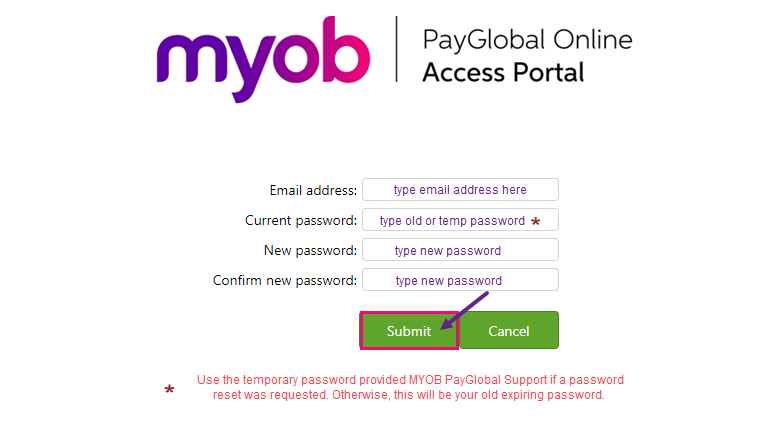
On the next screen,

  1. Enter the email address linked to the PayGlobal Online Access Portal
  2. Enter your current PayGlobal Online Access Portal password
  3. Enter your new Password which meets the complexity requirements

    • Must not contain the user’s account name or parts of the user’s full name that exceeds two consecutive characters. 
    • Be at least 12 characters in length.
    • Cannot a password which was used within the last 24 password changes. 
    • Contain characters from three of the following four categories: 
      • English uppercase characters (A through Z) 
      • English lowercase characters (a through z) 
      • Base 10 digits (0 through 9) 
      • Non-alphabetic characters (for example, !, $, #, %) 
  4. Re-enter your new Password to confirm
  5. Click Submit