

You are viewing an old version of this page. View the current version.
Compare with Current View Page History
« Previous Version 2 Next »
https://help.myob.com/wiki/x/FBfnAQ
How satisfied are you with our online help?*
Just these help pages, not phone support or the product itself
Why did you give this rating?
Anything else you want to tell us about the help?
Release Date: 21 June 2018
This is the latest version of MYOB Practice Solutions for:
Australia:
Accountants Enterprise (AE) – MYOB AE 2018.0 (including Tax 6.46 and Tax 8.30)
Accountants Office (AO) – MYOB AO 2018.0
New Zealand:
Accountants Enterprise (AE) – MYOB AE 2018.1
Accountants Office (AO) – MYOB AO 2018.1
For Document Manager users
We recommend that you re-index your document store before installing this release if coming from an earlier version than (AU) 2017.2 (NZ) 2017.3.
It is not required if you’re upgrading directly from (AU) 2017.2 or 2017.3 or (NZ) 2017.3 or 2018.0 where you have already run the document re-index routine.
This process may take a number of days depending on the size of your document store. Refer to KB 23096 for further information.
SQL 2017 x
Compatibility
(AE) Most MYOB AE products have been tested for SQL 2017 compatibility and have passed certification testing.
(AE) SQL Server 2017 is a 64-bit only application. Microsoft hasn’t released an SQL 32-bit version from SQL 2016 onwards.
If you’re running a 32-bit edition of SQL, you can’t upgrade to SQL 2017. However, MYOB offers an SQL Instance Migration service to update a 32-bit version of SQL to a new instance of SQL 2017 – contact your client manager for more information.
(AE) You’ll need a Windows 64-bit operating system if you want to install SQL 2017. You can’t install SQL 2017 on a Windows 32-bit operating system (Windows 10 32-bit, and Windows 8 or 8.1 32-bit).
(AO) MYOB AO products are not compatible with SQL 2017.
Since MYOB AO version 2017.2 was released in January 2018, MYOB AO is now supported on SQL Express 2014 32-bit.(NZ) For New Zealand sites using AE Tax Manager integrated with MYOB AO Classic, SQL Express 2014 32-bit is the latest currently supported SQL technology. If you’d like to join a pilot program to use SQL 2016 or SQL 2017, send an email to betasupport@myob.com.
For important information about supported versions and known issues, refer to KB 39102.
Two-factor authentication x
What is it?
Your MYOB login now requires mandatory two factor authentication (2FA) to help protect your online identity, your client's online data, and your practice reputation.
If you haven't activated 2FA yet (via mobile app or email) you will not be able to download this latest release.
Click here to activate 2FA – it only takes a few minutes.
Find out more at What is 2FA? or read 2FA for accountants & bookkeepers in our online help.
We’ve got a new look! x
Knowledge Base x
We’ve given our Knowledge Base a makeover! Get up to speed by checking out our step-by-step guide.
Tax 2018 online help (Australia) x
You will notice our Tax 2018 online help has also changed its appearance. Press [F1] anywhere in your tax product and you will go to help relevant to what you’re currently doing.
Rebranding x
We’ve brightened up our systems with our new branding. You will notice a new icon on your desktop, in your system tray, and throughout the system. You’ll also see new screens when you’re installing and running this release.
Why am I still seeing old icons after installation?
If you open a tax return from 2017 or earlier, you will still see old icons and screens. 2018 tax returns will be updated with the new branding.
If old icons are still being displayed on your screen for anything other than previous years’ tax returns, refer to KB 39169.
Tax (Australia) x
Lodgment availability during Tax Time 2018 x
ATO won’t be processing tax returns on Saturday 23 June and Sunday 24 June, because they’ll be updating their systems in preparation for Tax Time 2018.
Lodgment of 2018 returns will be accepted by the ATO from Monday 25 June, but they won’t start processing them until Friday 6 July.
CloudAuth users:
2018 returns lodged before Monday 25 June will be held by the MYOB Agency and will display a status of Transmitting. The returns will be sent to the ATO on Monday 25 June.
Auskey users:
2018 returns lodged before Monday 25 June will be rejected with a Software not registered error message.
The processing of 2017 returns and prior year returns carries on as usual.
For more information, refer to System availability and start of return processing on the ATO website.
Compliance changes to MYOB tax x
PLS is now the only way to lodge 2017 and 2018 tax returns.
ELS can only be used to lodge:
Activity statements
2017 Direct Debit Authorisation (EM)
Agent request reports.
The ELS forms and reports will be transitioning to PLS over the coming year.
Tax changes for multiple returns
The temporary budget repair levy has ended.
Changes to capital gains withholding rules (FRCGW) for foreign and Australian residents.
Depreciation:
Accelerated depreciation for small business extended until 30 June 2018.
Rental properties:
Limiting plant and equipment depreciation deductions for residential premises assets.
Disallowance of deductions of travel expenses for residential rental property.
Changes to the International Dealings Schedule:
Section A – International related party dealings
13f R&D and overseas intangibles.Section B – Financial Arrangements
19a arrangements involving hybrid instruments.Section C – Interests in Foreign Entities
The ATO have split question:
21 into five parts (21a to 21e), controlled foreign companies (CFCs) and trusts (CFTs)
23 into two parts (23a and 23b), attribution income of CFC
28 into two parts (28a and 28b), non-resident trusts and foreign hubs
29 into two parts (29a and 29b), cross border hybrid entities and hybrid instruments.Section D - Thin Capitalisation
The ATO have split question:
30 into two parts (30a and 30b), rules affecting you
37 into three parts (37a, 37b and 37c), non-ADIs.- Section E – Financial Services Entities
The ATO have split question:
40 into three parts (40a, 40b and 40c), foreign banks. - Tax incentives for early stage innovation companies.
- New arrangements for venture capital investment.
Tax changes for individual tax returns
The Medicare levy low-income thresholds will be increased from the 2017-18 income year.
Temporary budget repair levy (TBRL) FBT rate sunset.
FBT changes and income tests for tax offsets – reportable fringe benefits.
Cost of managing tax affairs – D10 for new reporting requirements.
Other income – item 24 for new reporting requirements.
Tax deductions for personal superannuation contributions.
- Tax offset for spouse contributions increase in income threshold.
- Transfer balance cap.
Tax changes to the SMSF return (MS)
New fields in Sections F and G: Member and Supplementary member information:
S1 Accumulation phase account balance
S2 Retirement phase account balance non CDBIS
S3 Retirement phase account balance CDBIS
TRIS Count
X1 Accumulation phase value
X2 Retirement phase value.
Client Update – Entities
The client name field in Client update forms has been lengthened and can now be edited so that it will match ATO records:
If the client has an ABN, enter the client name exactly as it appears in the Australian Business Register ABN lookup
Do not abbreviate words and ensure there is correct spacing between words
Do not wrap a word between 2 lines, as Tax will insert a space between lines.
The ATO has removed the validation test CMN.ATO.GEN.428042 Message Non Individual Name cannot contain "The trustee", "The Exec", "exec" or "the TTE".
If the client has a registered name with this naming convention, it must be included on the client update form, otherwise the form will be rejected with CMN.ATO.GEN.EM0008 & CMN.ATO.GEN.EM0014. This is particularly the case for Trust clients who are registered with the prefix The Trustee for.- The cug Change of Details (CUDTL) form has been removed from the Company return, as the form can only be used to update the legal name for a partnership, trust or super fund.
Direct Debit Authorisation (EM)
There is no Direct Debit Authorisation schedule in 2018. The 2017 EM can be lodged via ELS until 15 December 2018. The replacement Direct Debit (DD) form in PLS will be included in a future release.
Bank account number validation changes
For 2018 tax returns, the ATO have changed validation on bank account number fields to allow alphanumeric characters. Account numbers can contain the letters A to Z (in upper or lower case) and the numbers 0 to 9.
The ATO have NOT made this change for 2017 and prior year returns. Returns with non-numerics in the bank account number field will still be rejected with an XBRL03 error message.
We have added a warning message in 2017 returns if the field contains invalid characters.
The hyphen character is invalid and will generate an error on validation.
Pre-fill Manager x
The Pre-fill Manager homepage enables you to download pre-fill reports for individual clients using the Practitioner Lodgment Service (PLS). You can view these reports in PDF format, and then use this information to populate the pre-fill information into a client’s tax return.
For more information on this feature, including what data will be pre-filled into tax, see the Pre-fill Manager online help or press [F1].
Refer to 2018 Pre-fill availability on the ATO website to see when the information will be available.
Resolved issues
To prevent validation errors, we’ll disable the Tax Claim Code if one of the pre-filled periods for private health insurance is blank.
A blank folder was being created in a client’s default document path whenever a pre-fill report was downloaded, even though the Pre-fill Report File Settings were pointing to a different path.
Lodgment Batch Viewer x
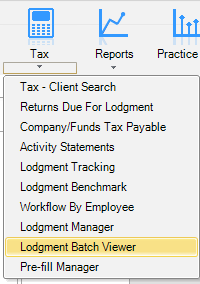
We’ve added a new feature – the Lodgment Batch Viewer, accessible from the Tax drop-down. See the Lodgment Batch Viewer online help or press [F1] for more detailed information.
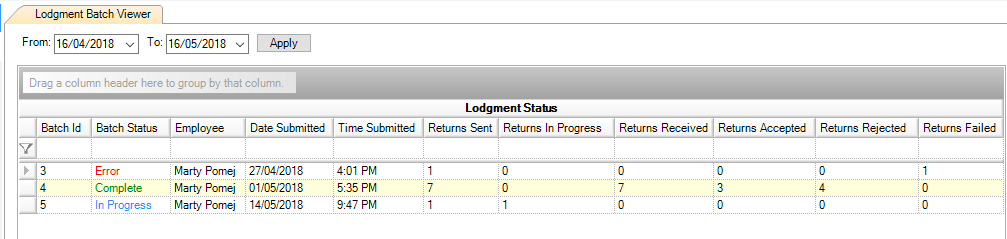
All individual and multiple returns that you submit are given a unique Batch Id. The status of each batch is listed on the new Lodgment Batch Viewer tab:
We’ve also created a combined validation report under the Tasks bar:
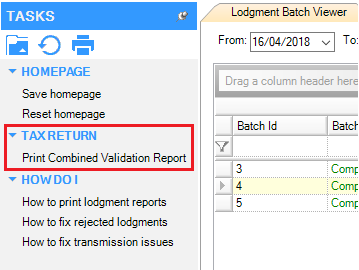
The report contains all of the validation reports for each return, and has four sections:
Summary
Returns in progress
Returns accepted
Returns rejected.
Resolved Issues – MYOB x
Printing
For an individual return with five or more PAYG summaries, the ABN is no longer truncated on the 5th and subsequent summaries.
Amounts in Additional PAYG Summaries were not totalling when Print details within the main return is selected.
In an individual return with interest pre-filled, page numbering may have been incorrect.
In an individual return with a Dividends Received (div) schedule, the full company name now prints when Print details within the main return is selected.
For returns with substituted accounting periods, the Taxation estimate now prints For the year ended as per the substituted accounting period.
Members with an account status of Closed will be printed in Section G – Estimate of the SMSF PDF.
In Small Business Trust distribution, for the Small Business Tax Offset worksheet the income field now prints the correct field name Total Trust share of net small business.
Estimate
A trust return with Adjusted taxable income higher than $180,000 is now calculating the temporary budget repair levy correctly.
UI (AE Only)
After printing an Electronic Lodgment Declaration, the Select return screen has overlapping text. This issue only occurs for some practices who open Tax through System Release.
PLS errors
The following validation errors were corrected in Tax 2017 and 2018 for:
Individual returns
CMN.ATO.GEN.XBRL03
Message: A field contains invalid data (such as letters in numeric or date field)
Employment Termination Payments with no ABN and zero amounts will receive this error on [F3] validation.
CMN.ATO.GEN.XBRL03
Message: A field contains invalid data
If bank account number fields contain a hyphen, it will generate error CMN.ATO.GEN.500145 in 2018 Trust, SMSF, Fund and Company returns and error CMN.ATO.IITR.000655 in 2018 Individual returns.
CMN.ATO.GEN.410063
Message: Given Name must contain at least one alphabetical character
This error occurred where given name only contained a hyphen.
Client Update
CMN.ATO.GEN.500125 (CUREL & CUADDR)
Message: Branch code must not be provided for Role Type “IT”
The branch code for ABN must not be provided when adding an income tax client
CMN.ATO.CUADDR.100001 (CUADDR)
Message: Residential address details are not valid for Role Type "AS"
In the Change address client update form, residential address type is only valid for income tax purposes.
CMN.ATO.GEN.EM0008 and CMN.ATO.GEN.EM0014
The Client Update form has been redesigned to reduce the occurrence of this error, as well as the ATO removing the validation for words that are acceptable when registering a trust name.
Resolved Issues – ATO x
On 9 June 2018, the ATO fixed the Interposed Entity Election (IEE):
CMN.ATO.IEE.410233
Message: Election status year specified for IEE must be 2011 or later
The edit test has been changed to allow for the year 2005 or later.
Known Issues – MYOB x
The Tax Office copy PDF for the International Dealings schedule (IDS) does not print Yes at question 12, and amounts do not print at question 21.
Known Issues – ATO x
The following issues have no scheduled fix date:
2017 Interposed Entity Election (IEE) forms are rejected with:
CMN.ATO.IEE.410266
Message: Declaration must be complete
The title picklist in 2018 has removed a space for RtRev Bishop:
CMN.ATO.GEN.000459
Message: Title is invalid
Errors occur in Fund and SMSF returns where RtRev Bishop is selected in the title field.
The following issues for 2018 have a scheduled fix for Friday 22 June:
2018 Company returns with Members Joining/Leaving a Consolidated Group (BN) schedule or Formation of a Consolidated Group (EX) currently reject with
CMN.ATO.GEN.410114
Message: Declaration Signatory Identifier text must be present
CMN.ATO.CTR.430222
Message: Attributed foreign income incorrect
CMN.ATO.IDS.440102
Message: Financial arrangements information not required.
My Academy x
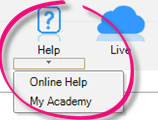
- Select Help > My Academy at the top of the AE/AO screen to access our new Accountants Enterprise/Office learning centre. Browse our extensive catalogue of free MYOB courses, to help you get the most out of your software.
Client Accounting x
How to get started x
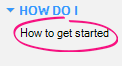
Select Tasks > How do I > How to get started in Client Accounting to see our new Client Accounting workflow help. This explains common workflows, and provides tips on how to use the system to maximise your productivity. This is in addition to our online help.
Enable Ledger and Assets x
You can now enable Ledger and Assets easily from the Client Accounting Settings screen:
We’ve renamed MYOB AE/AO Client Accounting > Accounting Product Locations to MYOB AE/AO Client Accounting > Client Accounting Settings
In Client Accounting Settings, click the Enable AE/AO Ledger and Assets button.
The Client Account Settings page is subject to security by using task permissions. Only super users/administrators have authority to enable Ledger and Assets.
Statutory Reporter x
Compliance (Australia)
For financial statements, we’ve:
added a sentence to the Inventories policy for all entities
removed a sentence from the Revenue and Other Income policy for all entities
removed a sentence from GST policy for all entities.
For Super funds, we’ve:
moved the Critical estimates and judgements policy from after the Basis of preparation in the introduction to be in its own policy. It will now print at the end of the policies
changed the Cash policy heading to Cash and cash equivalents
removed a sentence from the Receivables policy
made several changes to the Audit report, including removing non-transaction data (NTD) fields and replacing with new paragraphs when additional information is required. The following paragraphs will only be printed when content is added:
Add paragraph - basis for opinion -Part A - Conditions that warrant qualification
Add paragraph - Part B - Basis for opinion- contravention of one of the provisions listed is material
Add paragraph - Approved auditors responsibility - add additional sections and regulations
The opening sentence of the audit report for an association has changed from “... management’s assertion statement” to “... the statement by members of the committee”.
Improvements (New Zealand)
Statutory Reporter has been extensively revised over the last 6 months, it now works with Essentials, AccountRight and the new AE/AO Ledger. All of the expected reports are available for non-reporting entities.
Modifications have been made for how non-deductibles and non-assessables are handled in the Profit and Loss report and Taxation note.
In the profit or loss statement account group, the group Expenses > Non-deductibles has been removed. The codes that were in this group have been moved to Expenses > Other.
A new account group has been created in Other Financial accounts > Tax Note > Non-assessable and non-deductible. This account group is only used by the Taxation note. The codes included here are duplicates of codes held in the profit or loss statement account group. The codes are from the following folders in the Profit or Loss statement account group:
Sales and income > Income > Non-assessable
Expenses > Non-deductibles (which are now part of Expenses > Other)
Income tax and other > Other > Non-assessable and non-deductible.
Codes in the first two account groups will print in the Profit or Loss statement with the deductible sales or expenses. If sub-codes are used for non-deductibles, the amount will be incorporated into the header total for that particular account. Codes in the non-assessable and non-deductible account group will print separately, after the subtotal for Income before tax and extraordinary items.
The Taxation note will now only include codes in account group Other Financial accounts > Tax Note > Non-assessable and non-deductible as add-backs.
The Profit or Loss Statement will only print differently to the prior release, if sub-codes are used in the expense range for non-deductibles.
The tax note will print the same as it did in the prior release if sub codes are not used; it's just the source of where it finds the addback information that has changed.
The Tax note will now include any farming activity in the Net profit before tax amount displayed.
(AO) We’ve improved the Tax Note so that it provides a reconciliation between Net Profit/Loss and Taxable Income by:
adding a new account group for Deferred Income / Expenses
updating the default account group mapping for the standard AO GL chart, to take account of Deferred Income / Expenditure and Losses brought forward.
A report will now display correctly when using a layout that includes 3 years or more, when this year or last year doesn’t have a value.
The Directory report will now only print associates relevant to that entity.
Previously it was printing additional information taken from the Associated tab. For example, if a non-company had an 'Is shareholder of' entry on the Associated tab, shareholders would be printed on the report.For companies, we’ve added a Non-Transaction Data field. This will be used to enter an authorisation date that will print in the Statement of accounting policies introduction.
Improvements (Australia)
We’ve updated the minutes:
by adding blank space next to each signature, so the signatory can add a date when they sign
so that you can turn each paragraph on and off as required, by selecting or deselecting the paragraph on the Reports tab
so that you can change a paragraph heading by selecting Rename reports on the task bar of the Reports tab.
We’ve changed the Minutes trust so that you either update the distribution of income with an amount or a percentage:
If you add an amount into NTD field beneficiaries - Net Income Distribution, the beneficiaries will be listed with an amount next to them
If you add a percentage into NTD field beneficiaries - Net Distribution Percentage, the beneficiaries will be listed with a percentage next to them.
If you enter something in both fields, nothing will be shown on the minute.
The Beneficiaries - Distribution of remaining income can be edited so you can enter the details of what happens to any remaining income.
We've added new account groups for Unpaid Trust Distributions to non current assets, current assets, and non current liabilities (current liabilities already existed). We've also mapped codes 501-549 for the entity type Other Trust, to swing between current assets and current liabilities.
Note headings in reports are now paragraphs and can be edited, so you can click on a note heading and simply type over what is there.
We’ve enhanced the page break feature in reports, so that a page break can now be inserted at the top of a section, or at a particular line.
This doesn’t apply for minutes, accounting policy notes and farm reports.
- Multiple rental statements are now available for Superfunds.
We’ve removed the word Total from all notes.
In Non-Transaction Data > Income Statement Options, we’ve added a Display other income above expenses checkbox. If selected, Other income will be printed before Expenses on the Income statement (rather than at the bottom).
We’ve created a new Compilation report for associations and superfunds.
We’ve changed the Compilation report for Other Trust so that it will fit on a single page when all six lines of the Address have been filled in (in most instances).
(AO only) The description file maintenance fields INDEP, INDPER and INDREL were missing from some template ledgers which could cause errors when running the Compilation report. These fields have now been added to all the template ledgers
Workpapers x
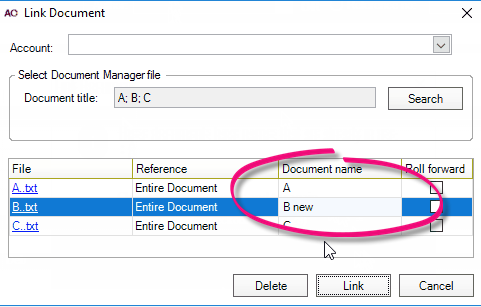
When you’re linking multiple documents in the trial balance, if there’s a duplicate name, you’ll see an error message and you’ll be able to rename the document in the Link document window under the Document name column. This is similar to when there are multiple link name duplicates.
We’ve fixed a number of scenarios where the workpaper period rollover would freeze, not complete, or time-out.
You no longer need to close and reopen a period to see changes made to assets journals. Assets journals can now be refreshed by selecting Refresh workpapers balances.
When a workpaper has been deleted, the red flag icon will no longer show on the Trial Balance screen.
The red flag icons on the Trial Balance screen will correctly and consistently display when accounts are expanded or collapsed
We’ve added team security to workpaper periods, so only authorised employees can see workpapers from the workpapers homepage.
(NZ/AO) We’ve changed workpapers to include additional journal entry lines to account for Loss Brought forward and Deferred Income and Expenses. If these journal entries are created correctly, the Tax Note will show a proper reconciliation between Net Profit/Loss and Taxable Income.
Workpaper templates (Australia) x
You can now add additional ‘Other’ items that may affect the reconciliation to all Detailed tax workpapers.
The Dividends Received workpaper has been updated to cater for small businesses as well as larger companies. We’ve added a Received from SBE checkbox; if ticked, the dividend will be franked with 27.5% (small business rate), if unticked, it’ll be franked with 30% (company tax rate).
The GST BAS Summary workpaper has two new columns:
Export Sales (G2)
Other GST-free sales (G3).
Other improvements x
When you select Reset Reports in the practice report settings, confirmation messages will now be displayed.
Practice Manager x
Resolved issues
When printing from any view using the printer icon in the task bar, the date and time stamp printed on the report will now be accurate based on the workstation date and time.
We’ll no longer send duplicate emails if you click Finish or OK multiple times in the Mail Merge and Send Email wizards.
(AE) We’ve fixed a performance issue when searching for a supplier in a large database.
Document Manager x
Improvements x
Bulk check-in is now available on the My Checked Out Documents homepage:
Select one or more documents using the checkboxes, then click the check-in icon at the bottom of the screen. The documents will be checked-in in the order listed on the screen
The Create a new document option is greyed out and can't be selected
All other options available to a single document check-in are available for bulk check-in
When the bulk check-in is running, a progress bar displays the number of documents checked-in and the number of documents remaining. No errors will be displayed during this process
When the process finishes, checked-in documents will disappear from the homepage, and documents that couldn't be checked-in will still be displayed
Use the single document check-in function to see the error message for a document that didn't check-in successfully.
Resolved issues x
We’ll no longer send duplicate emails if you click Finish or OK multiple times in the Mail Merge and Send Email wizards.
Tax Manager (New Zealand) x
Improvements x
From 1 October 2018, the 2020 tax year will become available. This allows access to the 2021 provisional tax calculator. Rates for the 2021 tax year have been added so the correct rates and uplifts can be calculated.
In the Tax Notices view you can now also see the previous four months notices. This means you can:
do a bulk review of the notices sent for the last due date
generate a notice that was missed.
You can also view the last four months notices for a specific client.
All existing functionality is available except View variance which is not triggered for a due date in the past.
The default sign for a Tax Pool Funds Transfer has been changed to a credit. This means that in most situations, you won’t need to add a minus sign in front of the amount.
Some clients in the Filing Statistics Unfiled view had a ‘blank’ return status. These clients will now have a return status of Not Started.
If an assessment is manually added via the Transactions view, we will now generate a terminal tax notice and provisional tax notice if applicable.
Resolved issues x
Manual and scheduled IRD data downloads will now include all clients. Previously, the downloads would exclude clients that the user running the bulk download was unable to view due to Team Security settings.
We’ve fixed the hyperlink to the tax pooling intermediaries list in the task bar of many views so that it points to the right place.
You’ll now be directed to the correct online help page when pressing [F1] on the Tax Notice > Send via email screen.
We’ll no longer send duplicate emails if you click Finish or OK multiple times in the Mail Merge and Send Email wizards.
We’ve fixed a performance issue where the Find Tax Client search is slow after installing version 5.4.27. This fix was previously made available via hotfix KB39256.
Version numbers x
MYOB Practice Solutions product version numbers:
Product | Version number |
|---|---|
(AU) MYOB AE/AO | 2018.0 |
(NZ) MYOB AE/AO | 2018.1 |
Client Accounting | 5.4.28.78 |
Corporate Compliance | 3.2 |
Document Manager | 5.4.28.78 |
Practice Manager | 5.4.28.78 |
Statutory Reporter Formats | (AU) 30 (NZ) 14 |
(AU) Tax Homepages | 7.0.4.34 |
How do I find out what version I have?
Open MYOB AE/AO.
Select Help > About from the menu bar.
Click the Plugins button to access the version number of individual products.
How do I find out my version of Statutory Reporter Formats?
Open MYOB AE/AO.
Select Maintenance > Maintenance Menu > Client Accounting > Practice Report Settings on the main menu.
The Practice Report Settings page opens.Click About on the Tasks bar.
 Yes
Yes
 No
No
 Thanks for your feedback.