

You are viewing an old version of this page. View the current version.
Compare with Current View Page History
« Previous Version 14 Next »
https://help.myob.com/wiki/x/oxeyB
How satisfied are you with our online help?*
Just these help pages, not phone support or the product itself
Why did you give this rating?
Anything else you want to tell us about the help?
This page explains how to set up and manage leave without pay (LWOP) in MYOB Advanced Payroll.
LWOP is a type of unpaid leave where an employee takes time off work when they would otherwise be working. Although employees can request LWOP at any time, they are not entitled to it. Approving LWOP depends on the employee's contract – if it's not outlined in their contract, it's up to your discretion as their employer. You can even negotiate LWOP agreements with your employee when they request leave.
It is strongly recommended to record the LWOP agreement in writing. Who's recommending this? Is it just us? I don't believe we're meant to give business advice in the help. We're just meant to tell them how to use the product.
While you don't need to pay wages to an employee who takes unpaid leave, it is important to note that leave without pay does not mean an employee is terminated, so some other entitlements might still apply. However, LWOP can affect the employee's annual holidays payment and entitlement in some situations.
An employee might request LWOP when they:
- don't have enough annual leave to cover the time they want to take off work
- don't have enough sick leave to cover a period of illness or injury
- want to continue their education
- go on sabbatical
- can’t take parental leave or negotiated carer leave.
Setting up MYOB Advanced to handle LWOP
There's a few steps involved in setting up MYOB Advanced to handle LWOP.
Ensure your annual leave entitlement caps employee accrual per period.
This prevents the employee from earning more than the entitled number of weeks at rollover, especially when trying to move the employee's anniversary date.
Create an LWOP entitlement.
Create an LWOP pay item.
Set up MYOB Advanced to handle LWOP.
If an employee takes more than one week of continuous LWOP (excluding unpaid sick or unpaid bereavement leave), then you and your employee can agree to one of two options:
If LWOP isn't considered a continuous employment, postpone the employee's holiday anniversary.
If LWOP is considered a continuous employment, reduce the divisor for calculating average weekly earnings (AWE).
- Go to the Entitlements screen (MPPP3300).
- In the Entitlement ID field, select your annual leave entitlement.
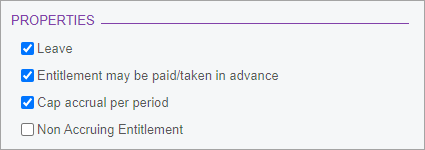
- On the Rules tab, select the Cap accrual per period checkbox.
- On the form toolbar, click the Save icon (
 ).
).
- Go to the Entitlements screen (MPPP3300).
- On the form toolbar, click the Add New Record icon (
 ).
). - Complete the Entitlement ID and Description fields. Make sure you give the entitlement a relevant ID, like "LWOP".

- On the Rules tab, in the Definition section, select the Units option and select Weeks from the dropdown.

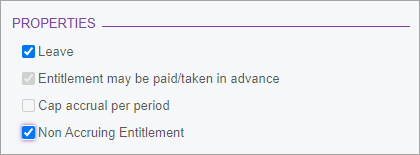
- In the Properties section, select the Leave and Non Accruing Entitlement checkboxes.
- On the form toolbar, click the Save icon ().
Postponing the employee's annual leave anniversary
The employee's anniversary date for entitlement to annual holidays is postponed by the amount of unpaid leave taken (excluding the first week). From them on, the employee becomes entitled to their annual holidays later each year.
To postpone the employee's anniversary date
Manually calculate the number of weeks the employee was on LWOP, as per the Holidays Act 2003 guidance.
- Adjust
Reducing the divisor for average weekly earnings
You can agree with the employee that their anniversary date for annual holidays entitlement won’t change. In this case, you must reduce the divisor for calculating average weekly earnings (AWE) for annual holidays by the number of weeks or part weeks greater than one week that the employee was on leave without pay
For example, two and half weeks of LWOP means the divisor should be reduced by two weeks excluding the initial one week, so gross earnings are divided by 50 weeks instead of the usual 52 to calculate AWE).
The following kinds of unpaid leave are exempt from this: unpaid sick leave, unpaid bereavement leave, unpaid parental leave, voluntary service and leave on ACC. For these leave types, you don't need to adjust the employee's anniversary date or AWE divisor. For more information, see Leave Without Pay on the MBIE website.
To reduce the divisor for average weekly earnings
2021.1.5 Release Notes