

You are viewing an old version of this page. View the current version.
Compare with Current View Page History
« Previous Version 3 Next »
https://help.myob.com/wiki/x/uRrnAQ
How satisfied are you with our online help?*
Just these help pages, not phone support or the product itself
Why did you give this rating?
Anything else you want to tell us about the help?
Beta Release Date: 10 September 2018
This is the latest version of MYOB Practice Solutions for:
Australia:
Accountants Enterprise (AE) – MYOB AE 2018.1 (including Tax 6.46 SP1 and Tax 8.30 SP2)
Accountants Office (AO) – MYOB AO 2018.1
New Zealand:
Accountants Enterprise (AE) – MYOB AE 2018.1
Accountants Office (AO) – MYOB AO 2018.1
For Document Manager users
We recommend that you re-index your document store before installing this release if coming from an earlier version than (AU) 2017.2 (NZ) 2017.3.
It is not required if you’re upgrading directly from (AU) 2017.2 or 2017.3 or (NZ) 2017.3 or 2018.0 where you have already run the document re-index routine.
This process may take a number of days depending on the size of your document store. Refer to KB 23096 for further information.
SQL 2017 x
Compatibility
(AE) Most MYOB AE products have been tested for SQL 2017 compatibility and have passed certification testing.
(AE) SQL Server 2017 is a 64-bit only application. Microsoft hasn’t released an SQL 32-bit version from SQL 2016 onwards.
If you’re running a 32-bit edition of SQL, you can’t upgrade to SQL 2017. However, MYOB offers an SQL Instance Migration service to update a 32-bit version of SQL to a new instance of SQL 2017 – contact your client manager for more information.
(AE) You’ll need a Windows 64-bit operating system if you want to install SQL 2017. You can’t install SQL 2017 on a Windows 32-bit operating system (Windows 10 32-bit, and Windows 8 or 8.1 32-bit).
(AO) MYOB AO products are not compatible with SQL 2017.
Since MYOB AO version 2017.2 was released in January 2018, MYOB AO is now supported on SQL Express 2014 32-bit.(NZ) For New Zealand sites using AE Tax Manager integrated with MYOB AO Classic, SQL Express 2014 32-bit is the latest currently supported SQL technology. If you’d like to join a pilot program to use SQL 2016 or SQL 2017, send an email to betasupport@myob.com.
For important information about supported versions and known issues, refer to KB 39102.
Tax (Australia) x
The ELS forms and reports will be transitioning to PLS over the coming year.
Tax changes for multiple returns
Pre-fill Manager x
The Pre-fill Manager homepage enables you to download pre-fill reports for individual clients using the Practitioner Lodgment Service (PLS). You can view these reports in PDF format, and then use this information to populate the pre-fill information into a client’s tax return.
For more information on this feature, including what data will be pre-filled into tax, see the Pre-fill Manager online help or press [F1].
Refer to 2018 Pre-fill availability on the ATO website to see when the information will be available.
Resolved Issues – MYOB x
Printing
Estimate
UI (AE Only)
PLS errors
The following validation errors were corrected in Tax 2017 and 2018 for:
Individual returns
CMN.ATO.GEN.XBRL03
Message: A field contains invalid data (such as letters in numeric or date field)
Employment Termination Payments with no ABN and zero amounts will receive this error on [F3] validation.
Client Update
CMN.ATO.GEN.500125 (CUREL & CUADDR)
Message: Branch code must not be provided for Role Type “IT”
The branch code for ABN must not be provided when adding an income tax client
CMN.ATO.CUADDR.100001 (CUADDR)
Message: Residential address details are not valid for Role Type "AS"
In the Change address client update form, residential address type is only valid for income tax purposes.
CMN.ATO.GEN.EM0008 and CMN.ATO.GEN.EM0014
The Client Update form has been redesigned to reduce the occurrence of this error, as well as the ATO removing the validation for words that are acceptable when registering a trust name.
Resolved Issues – ATO x
On 9 June 2018, the ATO fixed the Interposed Entity Election (IEE):
CMN.ATO.IEE.410233
Message: Election status year specified for IEE must be 2011 or later
The edit test has been changed to allow for the year 2005 or later.
Known Issues – MYOB x
The Tax Office copy PDF for the International Dealings schedule (IDS) does not print Yes at question 12, and amounts do not print at question 21.
Known Issues – ATO x
The following issues have no scheduled fix date:
2017 Interposed Entity Election (IEE) forms are rejected with:
CMN.ATO.IEE.410266
Message: Declaration must be complete
The title picklist in 2018 has removed a space for RtRev Bishop:
CMN.ATO.GEN.000459
Message: Title is invalid
Errors occur in Fund and SMSF returns where RtRev Bishop is selected in the title field.
The following issues for 2018 have a scheduled fix for Friday 22 June:
2018 Company returns with Members Joining/Leaving a Consolidated Group (BN) schedule or Formation of a Consolidated Group (EX) currently reject with
CMN.ATO.GEN.410114
Message: Declaration Signatory Identifier text must be present
CMN.ATO.CTR.430222
Message: Attributed foreign income incorrect
CMN.ATO.IDS.440102
Message: Financial arrangements information not required.
My Academy x
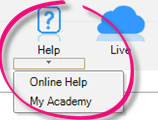
- Select Help > My Academy at the top of the AE/AO screen to access our Accountants Enterprise/Office learning centre. Browse our extensive catalogue of free MYOB courses, to help you get the most out of your software.
Client Accounting x
How to get started x
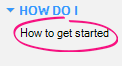
Select Tasks > How do I > How to get started in Client Accounting to see our new Client Accounting workflow help. This explains common workflows, and provides tips on how to use the system to maximise your productivity. This is in addition to our online help.
Statutory Reporter (New Zealand) x
- We've removed redundant account groups from the Statutory Reporter mapping:
- Trade and other receivables and Inventories from the Non-current assets section
- Trade and other payables and Tax provision from the Non-current liabilities section.
If an account has previously been mapped to one of these groups, it will now appear in the unallocated section of the account group mapping window.
Statutory Reporter (Australia) x
When a user deselects the Property, Plant and Equipment note on the reports list, the detail from that note will now be displayed in the Balance sheet.
Reports will now display the correct singular or plural wording for trustees and directors by checking how many trustees and directors have the 'elected' checkbox ticked under non-transaction data (NTD).
The word “Accountants” has been removed from each of the footer paragraphs in practice reports.
We've updated the address field on the compilation report, so that Suburb, State and Postcode are on a single line.
Workpapers x
Workpaper templates (Australia) x
You can now add additional ‘Other’ items that may affect the reconciliation to all Detailed tax workpapers.
The Dividends Received workpaper has been updated to cater for small businesses as well as larger companies. We’ve added a Received from SBE checkbox; if ticked, the dividend will be franked with 27.5% (small business rate), if unticked, it’ll be franked with 30% (company tax rate).
The GST BAS Summary workpaper has two new columns:
Export Sales (G2)
Other GST-free sales (G3).
Other improvements (New Zealand) x
- We've corrected small spelling errors in the NZ MAS MYOB Standard charts for MYOB Ledger including:
- 257, 267 - Construction (contruction)
- 305 – Intangibles (intagibles)
- 34501-34506 – Directors’ (directors’s)
- 675, 677 – Doubtful (doubtfull)
- 80200, 80300 - Accumulated (accumalated)
- 80300 - Impairment ( impariment)
- 810 - Development (developement)
- 889 - Transferred (tranferred)
Other improvements (Australia) x
- The opening balance review will now match account codes first rather than names to ensure successful matching where accounts have different names (for example, "bank fees" not matching with "bank charges").
Practice Manager x
Resolved issues
When printing from any view using the printer icon in the task bar, the date and time stamp printed on the report will now be accurate based on the workstation date and time.
We’ll no longer send duplicate emails if you click Finish or OK multiple times in the Mail Merge and Send Email wizards.
(AE) We’ve fixed a performance issue when searching for a supplier in a large database.
Document Manager x
Improvements x
Bulk check-in is now available on the My Checked Out Documents homepage:
Select one or more documents using the checkboxes, then click the check-in icon at the bottom of the screen. The documents will be checked-in in the order listed on the screen
The Create a new document option is greyed out and can't be selected
All other options available to a single document check-in are available for bulk check-in
When the bulk check-in is running, a progress bar displays the number of documents checked-in and the number of documents remaining. No errors will be displayed during this process
When the process finishes, checked-in documents will disappear from the homepage, and documents that couldn't be checked-in will still be displayed
Use the single document check-in function to see the error message for a document that didn't check-in successfully.
Resolved issues x
We’ll no longer send duplicate emails if you click Finish or OK multiple times in the Mail Merge and Send Email wizards.
Tax Manager (New Zealand) x
Improvements x
From 1 October 2018, the 2020 tax year will become available. This allows access to the 2021 provisional tax calculator. Rates for the 2021 tax year have been added so the correct rates and uplifts can be calculated.
In the Tax Notices view you can now also see the previous four months notices. This means you can:
do a bulk review of the notices sent for the last due date
generate a notice that was missed.
You can also view the last four months notices for a specific client.
All existing functionality is available except View variance which is not triggered for a due date in the past.
The default sign for a Tax Pool Funds Transfer has been changed to a credit. This means that in most situations, you won’t need to add a minus sign in front of the amount.
Some clients in the Filing Statistics Unfiled view had a ‘blank’ return status. These clients will now have a return status of Not Started.
If an assessment is manually added via the Transactions view, we will now generate a terminal tax notice and provisional tax notice if applicable.
Resolved issues x
Manual and scheduled IRD data downloads will now include all clients. Previously, the downloads would exclude clients that the user running the bulk download was unable to view due to Team Security settings.
We’ve fixed the hyperlink to the tax pooling intermediaries list in the task bar of many views so that it points to the right place.
You’ll now be directed to the correct online help page when pressing [F1] on the Tax Notice > Send via email screen.
We’ll no longer send duplicate emails if you click Finish or OK multiple times in the Mail Merge and Send Email wizards.
We’ve fixed a performance issue where the Find Tax Client search is slow after installing version 5.4.27. This fix was previously made available via hotfix KB39256.
Version numbers x
MYOB Practice Solutions product version numbers:
Product | Version number |
|---|---|
(AU) MYOB AE/AO | 2018.0 |
(NZ) MYOB AE/AO | 2018.1 |
Client Accounting | 5.4.28.78 |
Corporate Compliance | 3.2 |
Document Manager | 5.4.28.78 |
Practice Manager | 5.4.28.78 |
Statutory Reporter Formats | (AU) 30 (NZ) 14 |
(AU) Tax Homepages | 7.0.4.34 |
How do I find out what version I have?
Open MYOB AE/AO.
Select Help > About from the menu bar.
Click the Plugins button to access the version number of individual products.
How do I find out my version of Statutory Reporter Formats?
Open MYOB AE/AO.
Select Maintenance > Maintenance Menu > Client Accounting > Practice Report Settings on the main menu.
The Practice Report Settings page opens.Click About on the Tasks bar.
 Yes
Yes
 No
No
 Thanks for your feedback.