

How satisfied are you with our online help?*
Just these help pages, not phone support or the product itself
Why did you give this rating?
Anything else you want to tell us about the help?
Where to begin
The following is a list of tasks we suggest you complete at the end of each month. Depending on the nature of your business, some of these tasks may not apply to you. Consult an accounting advisor (such as your accountant) if you require help with your month-end tasks.
End of financial year
At the end of each financial year, there are additional tasks you need to complete before locking the period. For more information, see End of financial year in Australia or End of financial year in New Zealand.

Invite your accountant
If you haven't already, invite your accountant to your MYOB Essentials business.
This will let them log in and work directly with your data, so they can do your tax and make any adjustments that are needed.
Lodge payment summaries
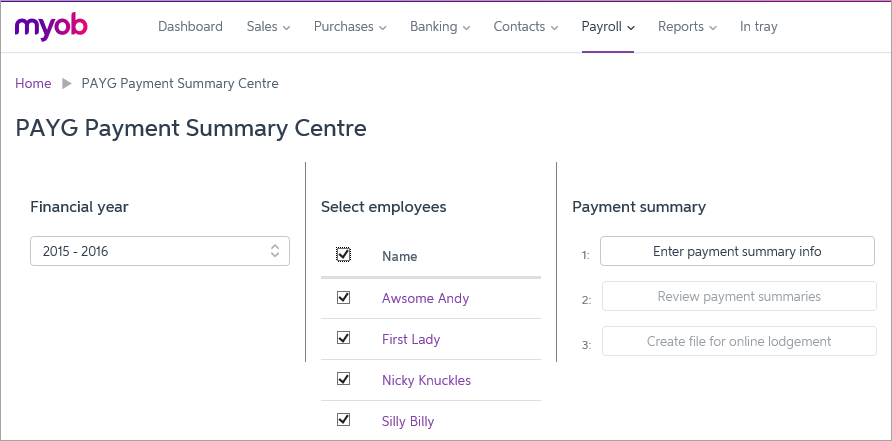
If you've paid any employees this year, you'll need to provide them with PAYG payment summaries (previously called group certificates) before 14 July. You'll also need to send this information to the ATO before 14 August. You can use MYOB Essentials to create and electronically lodge your payment summaries.
Report payments to contractors
If you work in the building and construction industry, you need to lodge a Taxable Payments Annual Report (TPAR), detailing the payments you've made to suppliers.
See Reportable contractor payments for information about what you need to report, and Producing the Taxable payments annual report for details of how to create the report.
Run reports
Your Profit & Loss and your Balance Sheet let you know how your business has performed throughout the year (which you've probably been checking regularly). You might like to print a copy for yourself.
- Profit and Loss tells you how much profit your business has made in the last year, divided into income, expenses and net profit.
- Balance Sheet tells you your business's net worth up to the end of the financial year. It's divided into assets, liabilities and equity.
See Business reports to learn how to produce these reports.
 Yes
Yes
 No
No
 Thanks for your feedback.