https://help.myob.com/wiki/x/9ARMAw
How satisfied are you with our online help?*
Just these help pages, not phone support or the product itself
Why did you give this rating?
Anything else you want to tell us about the help?
Australia only
This content is obsolete, so we’ve retired the page.
You can remove any bookmarks to this page. If there’s something else you need, try searching our help centre.
The JobKeeper program ended on 28 March 2021
If you had employees being paid under JobKeeper right up to the end of the scheme, there's nothing you need to do in MYOB (you don't need to select a Final Fortnight for those employees).
For key dates and actions for employers, see the ATO website.
Under the government's JobKeeper extension, a tiered payment rate applies to eligible employees. This is different from the original JobKeeper payment where a flat rate was used.
Here are the two tier levels, who they apply to and when they apply:
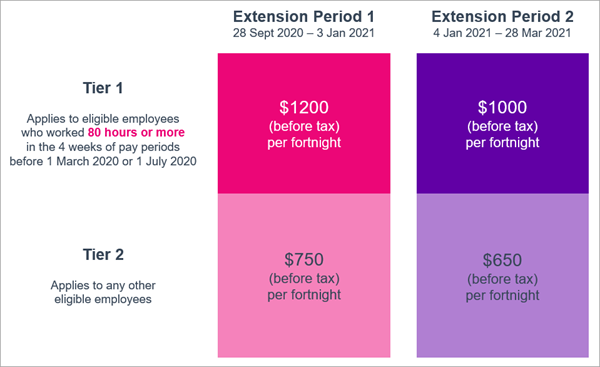
The 80-hour threshold is based on certain pay items. For clarification of what counts toward the 80-hour threshold, check the ATO's information.
You need to notify the ATO of your employees' tier levels. To help you make a decision, there's a list of suggested tier levels you can view from the Payroll Reporting Centre. You can also learn more about these tiers and payment rates on the ATO website.
If you don't notify the ATO of an employee's tier level, you won't be reimbursed for their JobKeeper payments.
Once you've confirmed each employee's tier level, you can assign those tiers and notify the ATO.
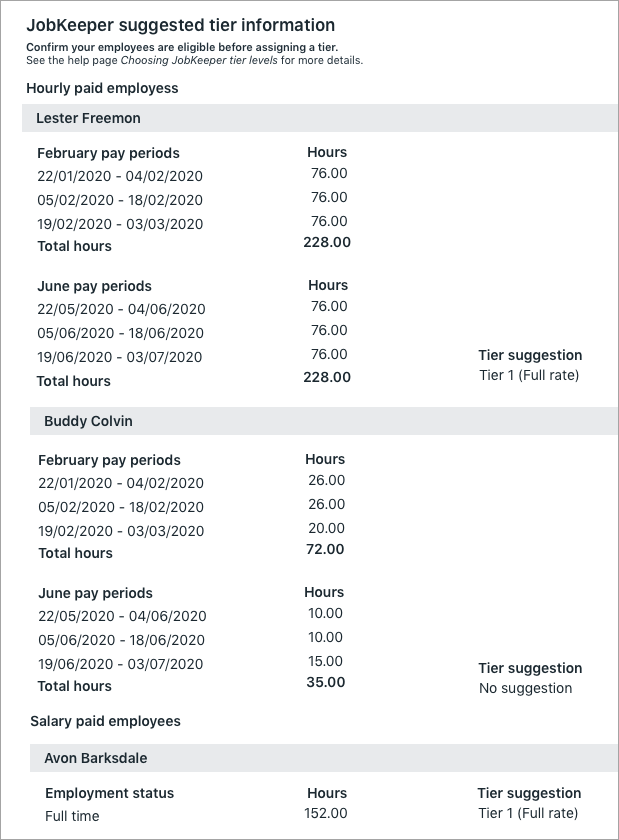
You can view a list of suggested tier levels for your employees based on their payroll information. These suggestions are based on details like pay basis (salary or hourly), employment status (full time, part time or casual), and pay runs processed in February or June.
Because each business is different, the way employees are set up and paid will always vary. This means that sometimes a tier level can't be suggested. In these cases, and to confirm the suggestions, you can check the employee's payroll details to determine their tier level.
To view JobKeeper tier suggestions:
- If it isn't already, open the Payroll reporting centre (Payroll menu > Single Touch Payroll reporting).
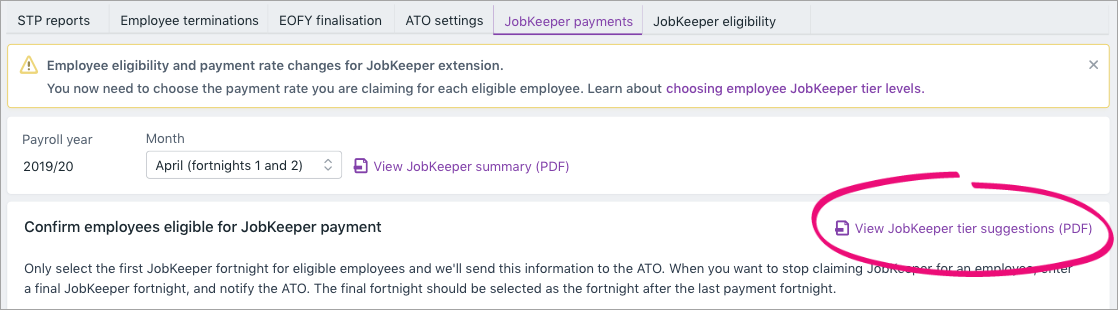
- Click the JobKeeper payments tab.
- Click View JobKeeper tier suggestions (PDF).
- Select the employees to include in the report.
- Click View report. The report opens displaying the hours worked for February and/or June. Where possible, a tier level will be suggested for each employee. Here's an example:
Confirming employee tier levels
Where possible, the above report will suggest employee tiers, but it's up to you to notify the ATO of the correct tiers for your employees.
Here are some tips for gathering information about your employees to help work out their tier levels. You should also check the ATO's information about the 80-hour threshold for employees for help determining tier levels.
- Check the employee's payroll details (Payroll menu > Employees > click to open an employee's details > Payroll details tab)
- Check their Employment status - are they full time, part time or casual? (Employment details tab > Employment status)
- Check their Pay details - are they on a salary or paid hourly, how often are they paid and for how many hours? (Salary and wages tab > Pay details)
- Run the Payroll advice report to see the hours paid and which payment types (pay items) they were paid in each pay period in February or June (Reporting menu > Reports > Payroll tab > Payroll advice)
- Run the Payroll activity report to see details of what each employee was paid for the months of February and June (Reporting menu > Reports > Payroll tab > Payroll activity)
Once you've confirmed your employees' tier levels, you can assign those tiers and notify the ATO.
- If it isn't already, open the Payroll reporting centre (Payroll menu > Single Touch Payroll reporting).
- Click the JobKeeper payments tab.
- Choose the applicable Employee tier for each employee.

- Click Notify the ATO.
Let your employees know
You need to advise your employees of the tiers you've assigned them and the associated payment rate within 7 days of notifying the ATO.
Viewing assigned tiers
Apart from the JobKeeper payments tab (where you assign your employees' tiers), you can see the tiers you've assigned to your employees:
- on the JobKeeper summary report which you'll use for your Monthly JobKeeper declarations - MYOB Business
- within an employee's pay, during a pay run.

Learn more about getting set up and making JobKeeper payments in MYOB.
FAQs
What if I've submitted the wrong tier for an employee?
You can change the employee's tier in the Payroll Reporting Centre and notify the ATO—the same way you submitted their original tier. See above for steps.