
Page tree

You are viewing an old version of this page. View the current version.

Compare with Current View Page History

« Previous Version 5 Next »


Close

How satisfied are you with our online help?*

Just these help pages, not phone support or the product itself

0
1
2
3
4
5
Very dissatisfied
Very satisfied

Why did you give this rating?

Anything else you want to tell us about the help?
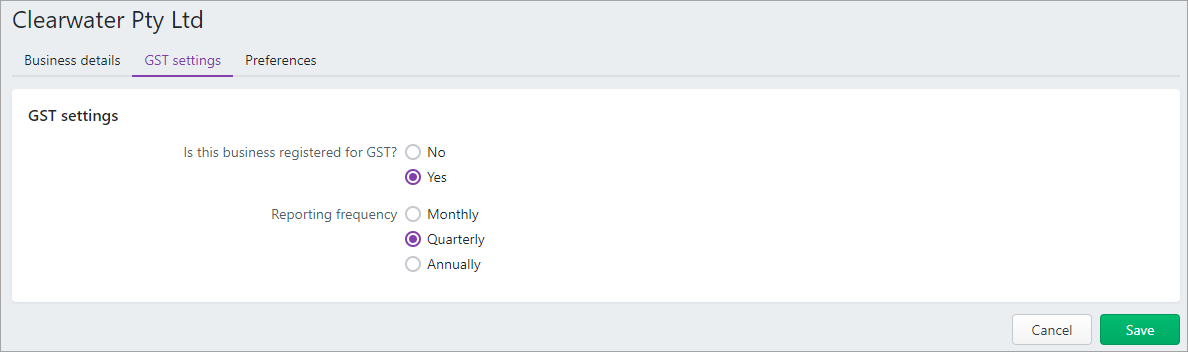
The GST settings in MYOB is where to choose if your business is registered for GST, and if so, how often you report your GST to the government. You can access these settings by clicking your business name and choosing Business settings > GST settings tab.

Here's what these settings look like for Australian businesses. The only difference for New Zealand businesses are the reporting frequencies.

You or your accounting advisor would likely have defined these settings when you started using MYOB.


Running a non-GST business

Do you have a hobby business or a low-trading business? You might not need to register it for GST if your turnover is less than the GST registration threshold (find out what this is for Australia or New Zealand).

We strongly recommend you check with your accountant and the ATO (Australia) or IR (New Zealand) if you're thinking of not registering your business for GST, or changing from a registered to non-registered business, as there are penalties for non-compliance if your business is required to register.

Regardless of how much or how little trade your business does, it's worth considering setting it up in MYOB to keep track of its performance and to help you avoid any compliance issues if it starts to grow.

Example

Jennifer has started a business from home, Dolls Inside a Doll, selling quirky handmade matryoshka dolls to friends and online customers. She estimates she might sell about $200 worth of stock a month. Based on the projected turnover of her business, she won't need to register it for GST. But she does want to track her expenses and sales, so she sets the business up in MYOB.

The main thing to note about running a non-GST business is that you won't charge your customers GST.

MYOB makes this easy. If you've indicated that you're not registered for GST in your GST settings, MYOB prevents you from choosing a tax code when entering transactions.

You also may not need to lodge an activity statement or GST return at end of period (but we recommend that you confirm this with your accounting advisor or the ATO/IR).

You may also need to keep track of your current and projected turnover to ensure you're not going over the GST registration threshold (find out what this is for Australia or New Zealand).

You can view your turnover by running business reports each month in MYOB.

Invite your accountant into your business, so they can monitor it and advise when you need to change its GST status. See Invite your accountant.

Changing your business GST registration

If you're changing from a GST registered business to a non-GST registered business (or vice-versa), it's a big change so you'll need help from your accounting advisor.

In MYOB, your GST registration status is on the Business settings page. Just click your business name and choose Business settings > GST settings tab.


If you change your GST registration in MYOB, you'll notice the following changes:

  • The Tax codes/GST codes page is hidden
  • All tax/GST codes fields and all tax inclusive/exclusive options are hidden
  • Bulk actions related to tax codes are hidden
  • New accounts are created with the tax code N-T
  • No autocalculate GST in Budget reports
  • The prepare BAS or IAS changes to just IAS.
  • In NZ we hide the “GST and provisional tax” page completely.
  • Existing transactions with keep the same tax code from the moment they were last saved.


Registered to non-registered


non-registered to registered


