Page tree

You are viewing an old version of this page. View the current version.

Compare with Current View Page History

« Previous Version 114 Current »


Close

How satisfied are you with our online help?*

Just these help pages, not phone support or the product itself

0
1
2
3
4
5
Very dissatisfied
Very satisfied

Why did you give this rating?

Anything else you want to tell us about the help?

If you can't sign in to your MYOB account because you're stuck with two-factor authentication, we're here to help you get back up and running.

When you contact us, you'll need the following details handy:

  • email address
  • mobile number
  • serial number or client ID.

Using SMS 2FA and don't have your phone?

When you sign in to your account, and you're prompted to verify your identity, click Try another method and follow the prompts to enter your recovery code (this code was provided when you set up SMS 2FA).

If you don't have a recovery code, visit the contact us page and ask MOCA, our virtual assistant, for help. If MOCA can't help, you'll be guided to our other support options, including live chat.

To recover your account (email and app 2FA only)
  1. Contact us on the MYOB website.

  2. After verifying your details with our team, you'll be emailed a recovery code.

  3. Follow the prompts in the email to sign into your MYOB account.
  4. When prompted, enter the recovery code.
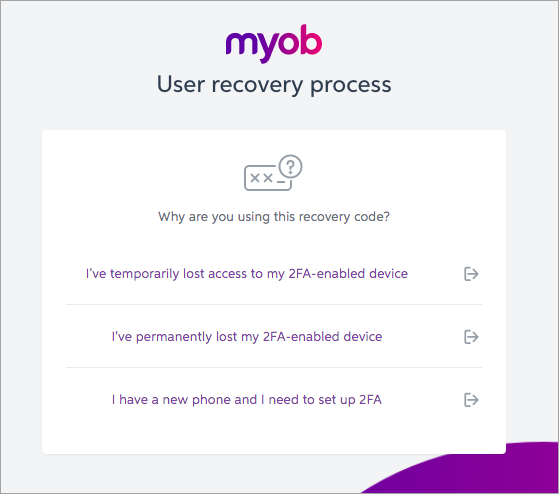
  5. In the list of reasons, choose the scenario that best describes why you're using a recovery code.
  6. The reason you choose will determine what to do next:

    I've temporarily lost access to my 2FA-enabled device

    (If this is your scenario, complete the steps above to choose this option)

    If you don't have access to your device or email account, but still plan on using it for 2FA in the future, click I've temporarily lost access to my 2FA-enabled device.

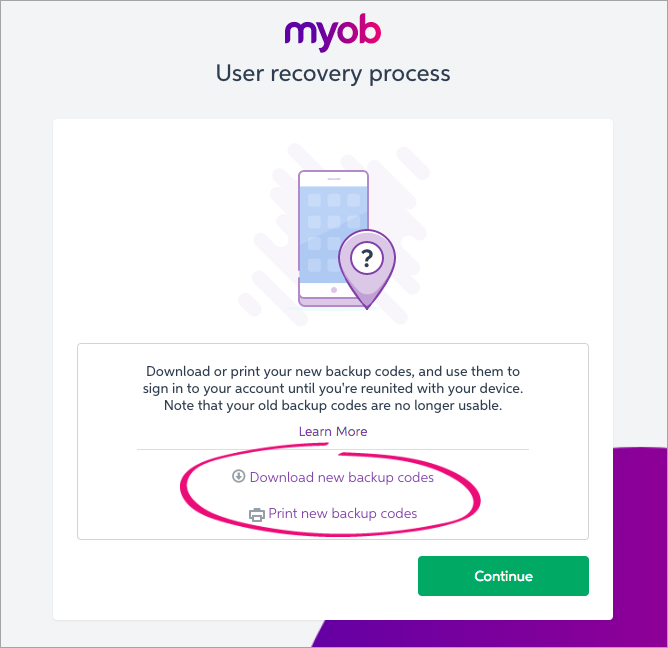
    Download or print your new backup codes. You can use these to sign in to your account if you encounter this situation again.

    Click Continue to access your account.

    I've permanently lost my 2FA-enabled device

    (If this is your scenario, complete the steps above to choose this option)

    If you don't have access to your device, and don't have a device to replace it, click I've permanently lost my 2FA-enabled device.

    You will now be switched to email 2FA to ensure you can continue to access your account.

    I have a new phone and I need to set up 2FA

    (If this is your scenario, complete the steps above to choose this option)

    If you want to switch 2FA to a new device, from the device or email you were previously using, click I have a new phone and I need to set up 2FA.