Child pages
  • Setting up salary sacrifice superannuation

You are viewing an old version of this page. View the current version.

Compare with Current View Page History

« Previous Version 2 Next »


Close

How satisfied are you with our online help?*

Just these help pages, not phone support or the product itself

0
1
2
3
4
5
Very dissatisfied
Very satisfied

Why did you give this rating?

Anything else you want to tell us about the help?
Australia only

You can set up salary sacrifice payments for employees who want to make additional superannuation contributions each pay. These payments will be deducted from the employee's gross pay, which means they will be deducted before tax.

You can also set up additional personal super contributions which will be deducted from the employee's net pay, which means they'll be deducted after tax.

Salary sacrifice payments are in addition to the compulsory superannuation guarantee contributions you make on their behalf. The amount being sacrificed can be a set amount, or it can vary each pay.

Need more info? The ATO website has some great info on the ins-and-outs of salary sacrificing super.

Here's how to set it up in MYOB Essentials:


1. Set up a salary sacrifice deduction

Set up a salary sacrifice deduction

  1. From the Payroll menu, choose Employees.
  2. Click the employee for whom you're setting up the salary sacrifice.
  3. Click the Earnings/Deductions tab.
  4. Under Deductions, click Add Deduction.
  5. Select the Type of deduction.

    If you're setting upchoose this
    a before tax salary sacrifice deductionSuper salary sacrifice
    an after tax personal super contributionSuper personal contrib'n
  6. Enter a Name for the deduction.
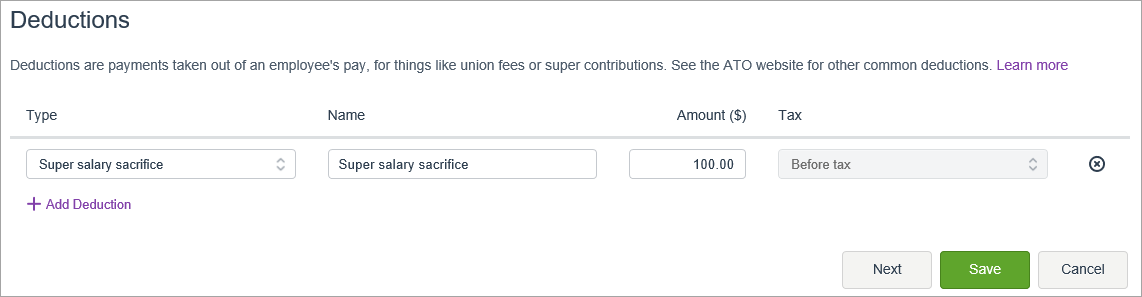
  7. Enter the Amount to be deducted each pay. If the amount will vary each pay, enter 0.00.
    Here's an example for a $100 before tax salary sacrifice deduction. Note the Tax field can't be changed.
  8. Click Save.

The salary sacrifice will now appear when paying the employee as shown in the next task.

2. Process a pay with salary sacrifice

Process a pay with salary sacrifice

  1. From the Payroll menu, choose Enter Pay.
  2. Select the employee to be paid then click Start pay run.
  3. Enter the number of hours being paid.
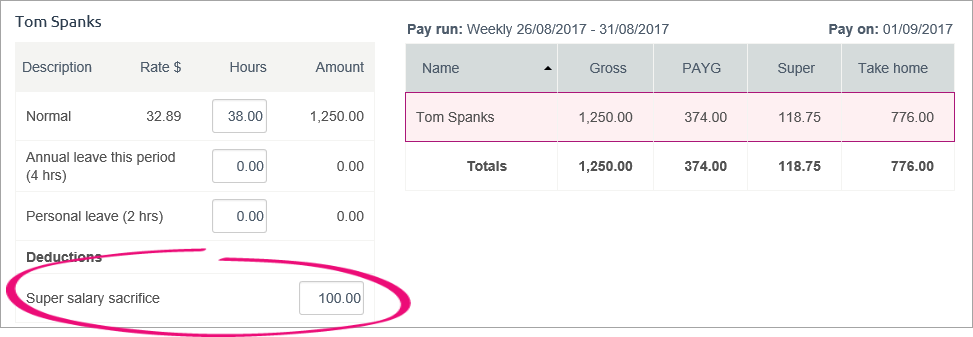
  4. If required, enter or change the amount being salary sacrificed.
    Here's our example where $100 is being sacrified.
  5. Finish processing the pay as normal.
 
From the community

Could not retrieve http://community.myob.com/myob/rss/search?rerenderComponentId=search.widget.message-search&cancelPendingOnNewRequest=false&allowPunctuation=false&componentQuilt=MessageSearch&listItemQuilt=MessageSearchItem&cancel_pending_on_new=false&filter=location&q=salary+sacrifice&quilt=MessageSearch&component=search.widget.message-search&location=Board%3AEssentialsAccounting&allow_punctuation=false&collapse_discussion=true&list_item_quilt=MessageSearchItem - Page not found.