Page tree

You are viewing an old version of this page. View the current version.

Compare with Current View Page History

« Previous Version 15 Next »


Close

How satisfied are you with our online help?*

Just these help pages, not phone support or the product itself

0
1
2
3
4
5
Very dissatisfied
Very satisfied

Why did you give this rating?

Anything else you want to tell us about the help?
Payroll in your upgraded MYOB Essentials is very similar to payroll in your old MYOB Essentials. But, if you've been using the MYOB super portal to pay your employees' super, you'll need to switch over to the Pay Super service.

There's also a few differences in pay runs and pay items you need to know about.

Doing a pay run

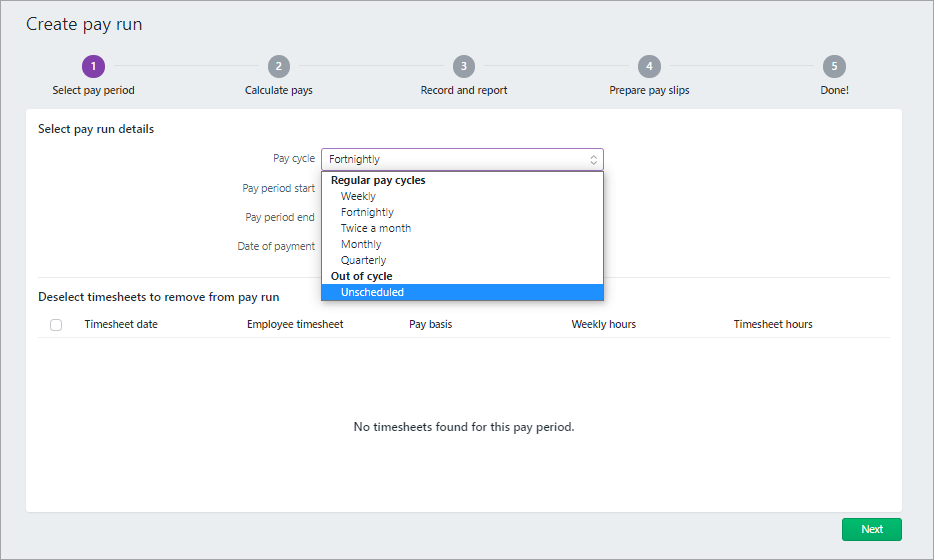
You have the new pay cycle options, Twice a month and Quarterly:

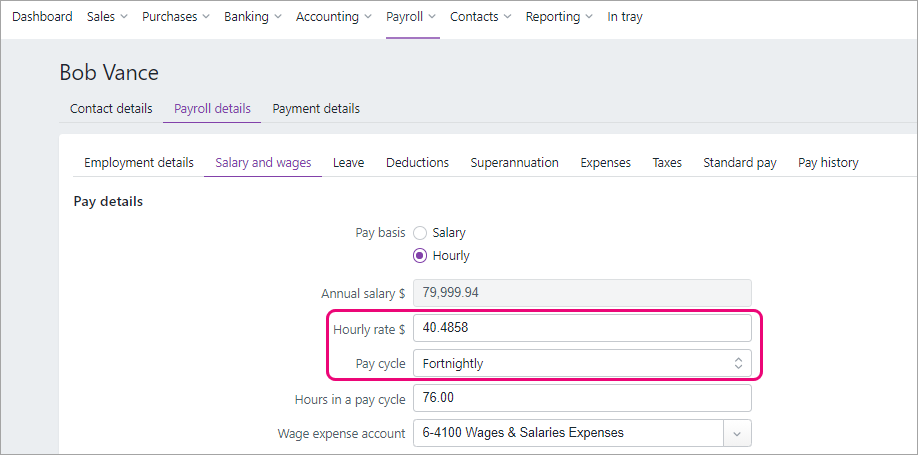
In each employee card (Payroll menu > Employees > Payroll detail tab), the Hourly rate and Pay cycle are based on their last recorded pay before the upgrade:

Superannuation

In your previous MYOB Essentials, you may have paid employee super using MYOB's super portal. In the new MYOB Essentials, you pay super using the Pay Super service. Like MYOB's super portal, Pay Super is SuperStream compliant. It's easier to make super payments using Pay Super and you get a clearer view of the status of your payments.

There's some one-off tasks to set up Pay Super – see Set up Pay Super.

What about previous MYOB super portal payments? Do they come across in the migration? Where can they be viewed? Check with Tristan.

Pay items

Just as in your old MYOB Essentials, you use pay items to calculate the different parts of an employee's pay, like wages, leave, deductions, superannuation and tax. There's a number of changes to pay items you should be aware of:

  • Additional super. The names of the super pay items, Super salary sacrifice and Super personal contrib'n, have changed to Salary Sacrifice and Employee Additional. These pay items, which could be found in the Deductions section of the employee, are now in the Superannuation tab (Employee > Payroll details > Superannuation). 

  • any new pay item in new MYOB Essentials will be automatically set to be included in all super and leave calculations. This differs from old MYOB Essentials, where the new pay item was excluded by super and leave calculations by default.

  • no option to filter Pay items by active or deleted status


Want to learn more about what's different in your new MYOB?

For more information on the upgrade of MYOB Essentials: