Child pages
  • Download your super records before upgrade

You are viewing an old version of this page. View the current version.

Compare with Current View Page History

« Previous Version 7 Next »


Close

How satisfied are you with our online help?*

Just these help pages, not phone support or the product itself

0
1
2
3
4
5
Very dissatisfied
Very satisfied

Why did you give this rating?

Anything else you want to tell us about the help?
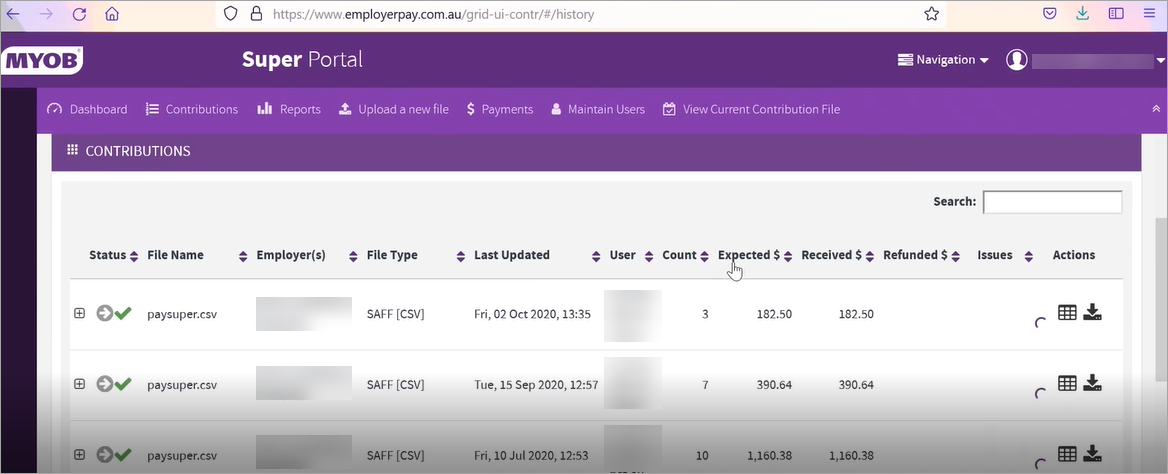
If you've received an email or in-product message that your MYOB Essentials file (or if you're an MYOB Partner, your client's files) will be upgraded soon, we recommend you log into MYOB's super portal and download your contribution statements and payment receipts. This is because after you upgrade, you won't be able to pay super using MYOB's super portal and eventually this service won't be available.

The Australian Taxation Office requires employers to keep super contributions records for five years from the date of the contribution.

We recommend that you download and save in a secure folder:

  • contributions
  • payment receipts.
To download contributions

To download contributions

  1. Log in to MYOB's super portal.
  2. Click Dashboard > Contributions.
  3. Click History to show your contribution history.

  4. Click the download icon for a contribution file.

  5. Click Save File and choose a location to save the file.

  6. Repeat from step 4 for all files you want to retain.

To download a payment receipt

To download a payment receipt


How do I pay super after upgrading?

In your new MYOB Essentials, you can pay employee super from your software using Pay Super. Like MYOB's super portal, Pay Super is Superstream-compliant. It's also easier to use – for example, you don't need to download a bank file when you pay employee super using Pay Super.

You'll be prompted to set up Pay Super in your new MYOB Essentials.


Want to learn more about what's different in your new MYOB?

For more information on the upgrade of MYOB Essentials: