

You are viewing an old version of this page. View the current version.
Compare with Current View Page History
« Previous Version 69 Next »
https://help.myob.com/wiki/x/BoUTB
How satisfied are you with our online help?*
Just these help pages, not phone support or the product itself
Why did you give this rating?
Anything else you want to tell us about the help?
- This page explains how to handle PIE income for tax returns in 2020 and 2021 tax years onwards.
- In 2021, legislation changes affected IR3's PIE income and it is reportable. The new calculations are included in this page.
The legislation changes didn't affect how IR3NR, IR4, IR6 and IR7 returns report PIE income.
- To work out your client's PIR (prescribed investor rate), use IR's find my prescribed investor rate tool.
- To learn more about PIE, check the IR page on income from portfolio investment entities.
Known issue
Currently, IR send you prepopulated data that includes negative tax credits. If you file a return where the total PIE tax credits are negative, you'll receive the error Code 21 XML failed. This is an issue with IR, which they are working on. Learn more.
To resolve this issue, you can:
- remove the negative tax credits and file the return. IR will assess the return including the PIE tax credits, so you need to consider the impact on the final calculation if choosing this option.
- file the return in myIR
- wait for IR to fix the issue.
Entering PIE income into a return
When IR have data available to use for prepopulation, we'll automatically create the schedules and workpapers with that prepopulated data. Learn more.
You can manually edit PIE income in your client's return.
- In the Tax return, add a tax workpaper and schedule for Portfolio investment entities (PIE) income.
For IR3
Handling PIE income in tax returns
Check how to handle PIE in the relevant return.
For IR3NR, IR4, IR6 and IR7
When you file return with PIE income, you don't always need to include the prepop data and you may need to delete it if it's already had tax deducted at the correct PIR for the full year.
To learn more, check out IR's help page and factsheet for New Zealand residents.
For 2021 returns, you'll calculate the PIE income using a different calculation to the rest of the IR3 return. The result will be included in the final tax calculation.
- In the Tax return page, click Tax workpapers & schedules to expand.
Click the Portfolio investment entities (PIE) income schedule.
To find your client's PIR, you can look in myIR or use the IR’s find my prescribed investor rate tool.
On the Portfolio investment entity (PIE) income (2021) page, click the Correct PIR at year end drop down and select the option that applies to your client.
Don't see any
- In the table, select the relevant option in these three sections:
- Actual PIR at year end
- Correct PIR at year end
- Did PIR change during the year?
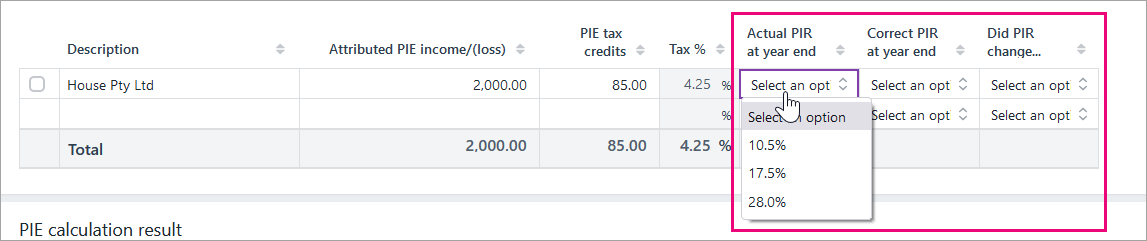
The calculation will appear in PIE calculation result:- If the result is a PIE debit, it'll be added to the tax to pay.
- If the result is a PIE credit, it'll be deducted from any tax to pay.
- Return to the Tax return page
Learn more about the PIE income calculation legislation changes for refunding overpaid pie tax in IR3.
For 2020, you need to enter the PIE income and credits only if the PIR was at the incorrect rate. Otherwise, you're not required to include PIE in the return.
You can’t claim PIE tax credits more than the allowable PIE tax credits. The PIE tax credits are calculated using the formula:
[(tax on taxable income/taxable income) x PIE income]
If the incorrect allowable amount is filed to the IR, the return will be rejected with a 2011 error. Any overpaid PIE credits can't be refunded.
For an IR3NR, PIE tax credits can only be used to the extent of the New Zealand tax payable on the PIE attributed income. This means the PIE tax credits may need to be adjusted before filing the return or it may be rejected with a 2053 error. Refer to IR's IR858 guide for more information on PIE for non-residents.
The PIE tax credits are calculated using the formula:
[(tax on taxable income/taxable income) x PIE income]
If the PIR was at the correct rate for the full year, you don't need to include the PIE income in the return.
If the PIR was at the incorrect rate, the PIE income needs to be included in the return. The PIE income and PIE tax credits get included with the standard income and tax credits in the return, so will be taxed at the relevant rate for the return type. For example, PIE income in an IR6 will be taxed at 33% when it needs to be included in the return.
To learn more, check out IR's help page or factsheet for non-residents.
If the PIR was at the correct rate for the full year, you don't need to include the PIE income in the return.
If the PIR was at the incorrect rate, the PIE income needs to be included in the return. The PIE income and PIE tax credits get included with the standard income and tax credits in the return, so will be taxed at the relevant rate for the return type. For example, PIE income in an IR6 will be taxed at 33% when it needs to be included in the return.
To learn more, check out IR's help page or factsheet for companies.
If the PIR was at the correct rate for the full year, you don't need to include the PIE income in the return.
If the PIR was at the incorrect rate, the PIE income needs to be included in the return. The PIE income and PIE tax credits get included with the standard income and tax credits in the return, so will be taxed at the relevant rate for the return type. For example, PIE income in an IR6 will be taxed at 33% when it needs to be included in the return.
To learn more, check out IR's help page or factsheet for trustees.
If the PIR was at the correct rate for the full year, you don't need to include the PIE income in the return.
If the PIR was at the incorrect rate, the PIE income needs to be included in the return. The PIE income and PIE tax credits get included with the standard income and tax credits in the return, so will be taxed at the relevant rate for the return type. For example, PIE income in an IR6 will be taxed at 33% when it needs to be included in the return.
To learn more, check out IR's help page for partnerships.
 Yes
Yes
 No
No
 Thanks for your feedback.