
Page tree

You are viewing an old version of this page. View the current version.

Compare with Current View Page History

« Previous Version 2 Next »


Close

How satisfied are you with our online help?*

Just these help pages, not phone support or the product itself

0
1
2
3
4
5
Very dissatisfied
Very satisfied

Why did you give this rating?

Anything else you want to tell us about the help?
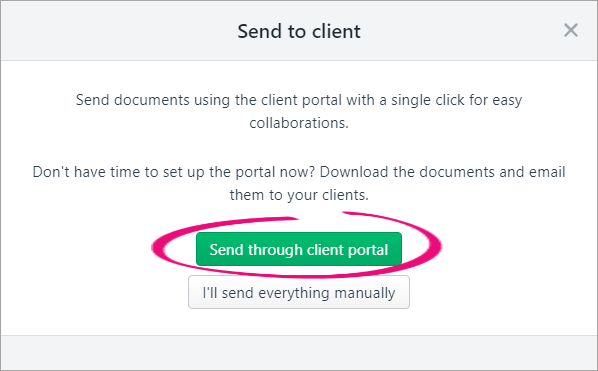
After validating and approving the tax return/activity statement, you need to get your client to approve it before lodgment.. They can approve with a signature on a paper form, or with a digital signature.

To send a tax return/activity statement via the portal, you'll need to have a portal for your client first. If you haven't created a portal for your client yet, see Create client portals.

To send a tax return/activity statement to a client via the portal
  1. In the client's Tax return page, click Send to client.
  2. Click Send through client portal.

    The Send to the client portal window appears.
  3. Fill in the details and click Send to client. A task is created with the tax statement attached. This task is assigned to your client in their portal. The status of the tax return updates to Pending client signature.
To send a tax return/activity statement to a client manually
  1. In the client's Tax return page, click Send to client.

    Can't see this button? Make sure the status of the return is Ready for client. See Reviewing and approving a tax return.

  2. Click I'll send everything manually.


    The status of the tax return changes to Pending client signature.

  3. Download a copy of the tax return or tax statement.

    1. In the Tax return page, click Download documents.

    2. Select Tax estimate or Tax return. A PDF copy of the tax statement or tax return downloads and saves to a location on your computer.

      Not sure where it went? Check your Downloads folder.

  4. Attach the PDF to an email or print and mail the tax return to your client.
  5. Once your client signs and approves the tax return or tax statement, click Client approved and signed. The tax return status changes to Lodge to ATO. You can now lodge the tax return.

What's next?

Learn how to lodge an activity statement or a tax return.


