
Page tree

You are viewing an old version of this page. View the current version.

Compare with Current View Page History

« Previous Version 34 Next »


Close

How satisfied are you with our online help?*

Just these help pages, not phone support or the product itself

0
1
2
3
4
5
Very dissatisfied
Very satisfied

Why did you give this rating?

Anything else you want to tell us about the help?
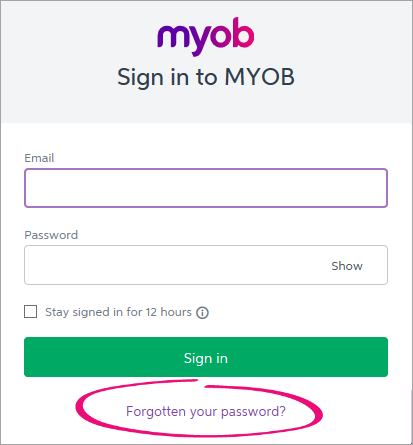
To access AccountRight online services you need to sign in using your MYOB account details. You'll be prompted to do this when required in AccountRight. You can also sign in from AccountRight's Library Browser window (accessible by clicking Open from the Welcome window), or from the Services > Sign in to AccountRight Live menu.

Your MYOB account (my.MYOB) details were set up when you registered AccountRight, or accepted an invitation to work online. If you can’t remember your password, click Forgotten your password and we’ll help you out.
MYOB sign in window with fogotten your password highlighted

Each user needs their own unique MYOB account. They’ll then have access to the online files they own, or have been invited to.

If you’re the only person who uses AccountRight on this computer, select Stay signed in for 12 hours.

If there's been too many unsuccessful login attempts, your MYOB account will be locked. You'll also receive an email advising how to unlock your account.


  FAQs


How do I sign out from AccountRight Live?

How do I sign out from AccountRight Live?

  1. In your AccountRight company file, go to the Services menu and choose Sign out from AccountRight Live. A confirmationmessage appears.
  2. Click Sign out. The company file closes and the Welcome window appears.
sign in 12 hours can not login
 
From the community

Could not retrieve http://community.myob.com/myob/rss/search?q=accountright+live+services+log+in&filter=labels%2Clocation&location=category%3AAccountRight&search_type=thread - Page not found.


